For state programs. What it takes, what you get.

This page is for the person who has to explain it to a board. It says what your office hands over, what every role gets back, what the first season looks like, and what stays yours. Nothing here needs a developer on your side.

What you hand over.

Two exports and one connection. Your office already produces all three.

Your referees

  • One export from the US Soccer Learning Center: names, licenses, clearances, contact details, date of birth.
  • Repeated whenever you like; a weekly load during registration season keeps the renewal count current.
  • Minors are flagged from the first load. Guardian contact is used in place of theirs wherever staff reach out.

Your games

  • Read access to your assigning platform. Assignr today; others on request.
  • Games sync automatically, every assigning group, weeks ahead. Nobody re-enters a schedule.
  • Referee names on games are matched to people once and remembered.

Your history, if you want the numbers

  • Past Learning Center exports, as far back as you have them. Colorado loaded fifteen seasons in an afternoon.
  • That is what makes the State view: registration by year, who stays, who leaves, who comes back.

Your brand

  • Your badge, your program name, your colors. Referees see your program, not ours.
  • Your rules pages per competition, your bulletins, your contact line in the footer.

What each role gets back.

Everyone signs in the same way, with a code sent to their email. What they see is decided by the unlocks your office gives them.

RoleScreensWhat changes for them
RefereeYour day, game card, rules, Library, fitness sign-up, Your yearTheir games, countdown, one-tap check-in, running late, coaching notes on their own phone, in English or Spanish. The renewal reminder, with the link, until they renew.
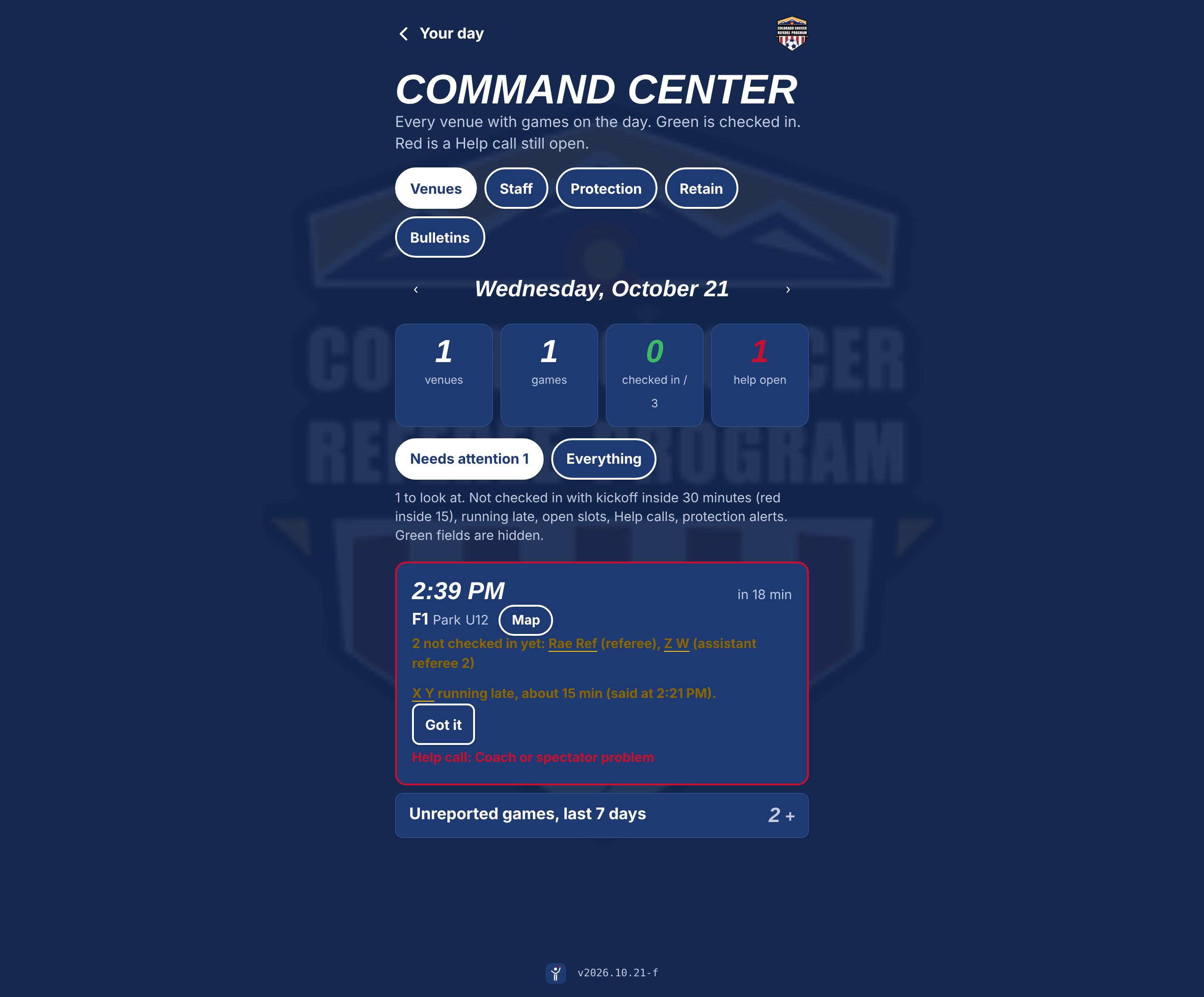
Site coordinatorCommand Center board, End of dayNeeds attention first: not checked in, running late, open slots, help calls. Tap a name, text them. Hours filed from the phone.
Referee coachCoaching, referee cards, the Evaluator, Fitness test sheetWho is at my venue, who has had no feedback, one note per referee in the moment. Formal evaluations and the fitness test run from the same phone.
Director of Referee DevelopmentReview, Coverage, EvaluationsEvery note cleaned and read before release. Who has been seen, who has read their notes. Formal evaluations by request.
Director of Referee OperationsSetup, People, Scheduling, End of dayEvents and rules, fitness tests and classes with sign-up, the not-yet-registered list with emails ready, payroll by venue or date range.
SRAState of the programFifteen years of registration, retention, demographics, geography on a map, the season live, the renewal pace week by week.
Command Center, Referee HQ
The Command Center board: venues, games, checked-in count, and a needs-attention list with a running late referee and an open help call

The board as it runs, shown with sample data.

The first season.

This is Colorado's path, compressed. A program that already uses Assignr and the Learning Center can be live for a weekend inside a month.

Week 1
People and games

Learning Center export loaded. Assigning platform connected. Your office checks a handful of referee cards against what it knows.

Week 2
Staff unlocks

Coordinators, coaches, reviewers and the SRA get their roles. Rules pages go up for the competitions in season. Your badge is in the corner.

Week 3
One venue, one Saturday

Referees at that venue get the sign-in email. The board runs. Coaches write. The reviewer releases that night. Sunday you have your first coverage numbers.

Weeks 4 to 8
Every venue

Each weekend adds venues. Fitness tests and classes move in. End-of-day reports replace the spreadsheet.

Registration
The renewal push

Every referee sees the renewal card until their new license shows up. Your office works the not-yet-registered list; assignors get the lapsed list for their groups. The SRA watches the count climb week by week.

Year end
Your year

Each referee gets their season: games, centers, venues, notes, fitness badge, where they rank. The leaderboard lets clubs that pay bonuses see their counts.

Questions a board will ask.

Where does our data live?

In a database under your program's own account, not ours. Access is by role, enforced in the database itself, not only in the app. If you ever stop, you keep everything.

Do we have to leave Assignr?

No. The platform reads from it. Assignors keep working the way they do. Referees stop opening three apps.

What about minors?

Minors are flagged from the Learning Center data. Staff who reach out see the guardian's contact. Protection alerts reach the board. Nobody's phone location is tracked, for anyone.

What does the AI do, and what doesn't it do?

It tidies coaching notes for tone and clarity. A person reads every note before it goes to a referee, and a flagged note cannot go out without a rewrite. It does not rate referees, assign games or decide anything.

Who supports it on a Saturday?

The person who built it, by phone. Updates ship as files; your office never installs anything. The app is a web page that lives on the home screen of any phone.

What does it cost?

It is a conversation, not a rate card. States pick the tools they want and pay per program or per person. Tournaments pay by the event, referee coaches by the seat. Ask for a demo and bring a weekend's schedule.

Request a demo